Security in Temporal Nexus
Temporal Nexus is now Generally Available for Temporal Cloud and self-hosted deployments.
Temporal Cloud provides built-in Endpoint access controls and secure connectivity across Namespaces. Self-hosted deployments can implement custom Authorizers.
Runtime access controls
In Temporal Cloud, each Endpoint has an access control policy: an allowlist of caller Namespaces.
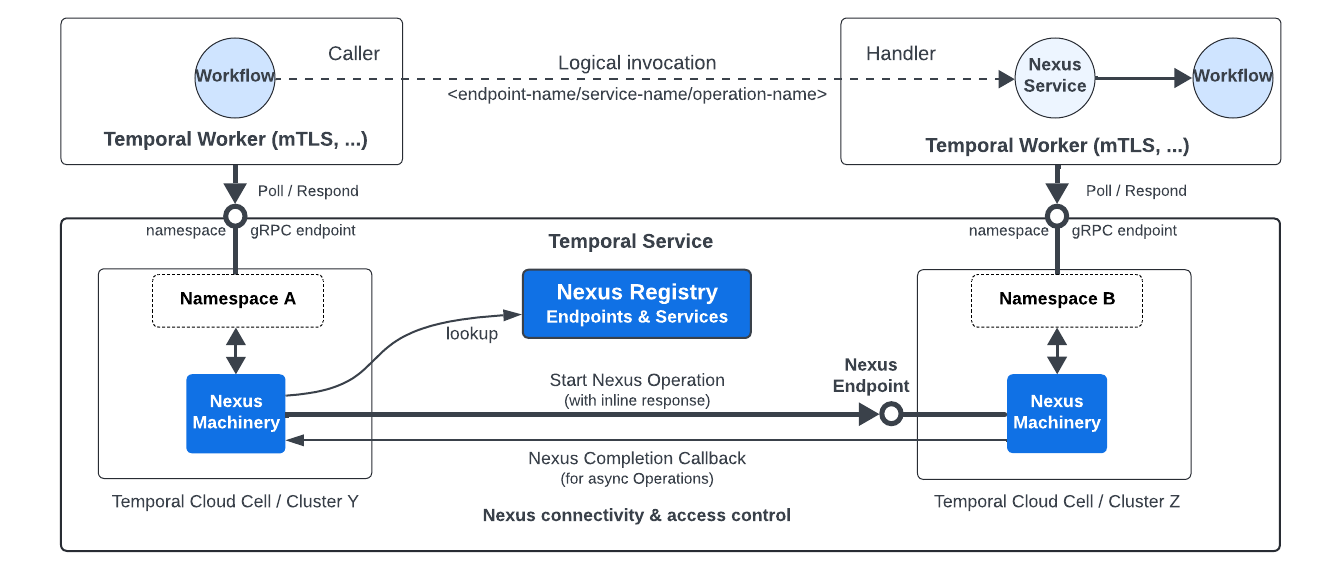
Nexus Security
Workers authenticate with their Namespace using mTLS or API key. When a caller Workflow executes a Nexus Operation, Temporal Cloud verifies the caller's Namespace is in the Endpoint's allowlist before routing the request to the handler. Temporal Cloud acts as a trusted broker across Namespace boundaries.
See Configure runtime access controls.
Secure connectivity
Temporal Cloud has built-in security connectivity across all Namespaces in an Account.
Self-hosted deployments rely on the Temporal Cluster being secure.
Temporal Cloud secures all Nexus communication:
- Workers authenticate to their Namespace using mTLS or API key.
- mTLS encrypts all cross-Namespace Nexus traffic (start, cancel, and completion callbacks) across cells and regions.
- Endpoints are only accessible from within a Temporal Cloud Account through the Temporal SDK - not externally accessible.
Payload encryption and Data Converter
Nexus uses the same Data Converter as Workflows and Activities - JSON, Proto, and binary payloads are all supported. If you use a Codec for encryption, it also encrypts Nexus payloads.
Caller and handler Workers must have compatible Data Converters. Payloads are encrypted by the sender (caller encrypts input, handler encrypts result).
Three common approaches for cross-Namespace payload encryption:
Option 1: Same encryption key
Both Namespaces share the same encryption key. Simplest approach - no additional configuration needed.
Option 2: Pass KMS key ID in payload metadata
Each Namespace uses its own encryption key, with the KMS key ID passed in Temporal payload metadata. The receiver reads the key ID from metadata and decrypts using KMS IAM permissions.
Works bi-directionally: caller encrypts input with the caller's key, handler decrypts using the key ID from metadata, then encrypts the result with the handler's key. The Codec Server needs KMS decrypt permissions for all relevant keys.
See the encryption sample and the reference-app-orders-go data converter.
Option 3: Wrapper types for endpoint-specific encryption keys
Use wrapper types (for example, EndpointValue) so the Data Converter selects an Endpoint-specific encryption key.
This encrypts only Nexus traffic with a dedicated key, without sharing Namespace keys across teams.
See the draft endpoint-based encryption sample.
Choosing an approach
Options 1 and 2, where both sides share the same key or flow the KMS key ID in payload metadata, work with the standard Data Converter. Option 3 is more advanced and is intended for teams that don't want to share their Namespace encryption keys with other teams.